Friday, October 8, 2010

9 Ways to Use Twitter Lists

f you automatically follow everyone who follows you, then you may find your home feed a bit overwhelming. In order to keep up with all of the people you want to follow based on their interests and your connection to them. Here are nine great Twitter lists to create and ways to use them.
1. Follow the Experts
Once you have found experts and influential Twitter users in your niche and industry, put them in a list so you can keep up with the latest conversation.
2. Learn About Your Subscribers
What better way to learn about your blog and mailing list subscribers than to follow their conversations on Twitter? This will give you a better insight into the topics they want to read about and the products they are looking for most and need! If you have a small list, simply export the emails to your address book and search for them on Twitter under Finding Friends, or use services like Flowtown that can find your customers and subscribers on any social network.

3. Monitor Your Competition
As a company owner or social media strategist looking for ways to use Twitter for business promotion, one great way to learn is by checking out how your competition utilizes it. Follow the top competitors for your business, and you will be able to see what works and what doesn’t.
4. Keep Track of Blogs to Comment On
If blog commenting is a part of your online marketing strategy, you know that being the first to comment means you will get the most exposure to all future commenters (assuming the blog dates comments in ascending order). Follow the blogger on Twitter – usually that is the first network they will update with their latest posts.
5. See the Latest Updates for Your Tools
Do you tools like HootSuite? Keep up with your favorite tools, software, and services on Twitter for their latest blog posts, news on upcoming features, and updates on any issues or outages.
6. Get to Know Your Current (or Future) Co-Workers
Is your company social? Create a Twitter list so you can keep up with office chatter. Planning to apply for a job? Why not find some people at the company to get a feel of who your interviewers might be?
7. Keep Yourself Entertained
Twitter doesn’t have to be all work and no play. You can create a list of your favorite shows, sports teams, or players and take a break from learning and networking to keep up with your favorite guilty pleasures and hobbies.
8. Don’t Miss Updates from Family & Friends
In the sea of people you follow for your business and your blog, what about when someone you really know adds you on Twitter? Be sure to keep a list of family and close friends so you never miss out on their updates.
9. Create Papers for Your Industry
Paper.li allows you to put Twitter updates in a newspaper like form. These papers can be created based on your own tweets, #hashtags, and of course, Twitter lists. So you can essentially create a list of your favorite sources on Twitter and then create papers for all of your followers that showcase the best of your Twitter list members’ updates.

Where to Find Lists

One of the best ways to find a solid Twitter list is to check out the ones created by experts in your industry – if they have created a list of the people they most respect in their niche, that will be a list to follow. There are also sites that help you find lists created by others including:

How to Organize Your Twitter Lists

You can access all of the Twitter lists you have created and are following from your Twitter homepage. Twitter management tools also help you view more of your Twitter lists simultaneously.
Tweetdeck Twitter List ManagementTwitter Lists in Tweetdeck
HootSuite Twitter List ManagementTwitter Lists in HootSuite
Tweetdeck and HootSuite, for example, allow you to create columns for each of your lists. HootSuite, my personal favorite, allows you to have 10 columns under each tab and an endless amount of tabs at your disposal, you can keep an eye on all of your lists easily.

source:-stayonsearch.

Thursday, October 7, 2010

Twitter Launches Promoted Accounts

Now, Twitter has officially launched promoted accounts which is a new advertising format aimed to gain more followers by displaying Twitter's "Suggestions For You" Features. Twitter has started syndication of promoted tweets and Promoted Trends to third-party apps.
Promoted Accounts utilizes algorithms that calculate whether you’d be interested in a specific promoted account before displaying it in the “Suggestions for You” section. Twitter’s   example is Xbox, which will be displayed to users that follow gaming-related accounts, but aren’t following @xbox.
Promoted Accounts is in the testing phase, so only a “handful of companies” will have their Twitter accounts promoted. It’s certain to expand over time if the tests prove successful.
Buried in Twitter’s announcement was another interesting tidbit, though; the company has officially begun testing Promoted Tweets and Promoted Trends in third-party apps, starting with Hootsuite. The company has been preparing for the rollout of Promoted Tweets and Trends in third-party apps for several months now.

While both are referenced in the Twitter API, only select partners can utilize them, at least for now. It’s being billed as a way for third-party developers to monetize their apps. Twitter has become increasingly competitive with its developers, creating a lot of uncertainty around the Twitter platform. Twitter acquired Tweetie earlier this year and launched BlackBerry and Android apps.

Source:http://mashable.com/2010/10/04/twitter-launches-promoted-accounts/

New and improved moderation features for LinkedIn Groups

Linkedin has improved the some new moderation features for linkedin groups.

1. Delete threads directly. One of the biggest concerns group managers have had is around spam and how best to manage it effectively. Starting this week, we’ve made it very easy for moderators to actively fight spam by deleting inappropriate content from the “More” tab on any LinkedIn groups’ thread.

2. Set up email notifications for new LinkedIn groups posts. If you want to clean out spam the minute it’s posted, as a group manager you can now get email alerts for every new post and delete spam straight from these emails.  Subscribe to these alerts by going to More > My Settings > Activity and check the box “Send me an email for each new discussion.”

3. Delete inappropriate posts right from your email updates. We’re also making it easier than ever for group moderators to delete inappropriate posts with one-click right from the email alerts of the discussions you follow in your group. In a coming release, managers and moderators can also remove, block, and delete not just one email thread but all contributions of the offending spammer right from these emails.

4. Find and encourage group members to help you moderate. You don’t have to take on the work of moderating your group alone. Deputize trusted members to help moderate so they can utilize all the great moderation features too.

5. Encourage your members to flag inappropriate content. We also wanted to make it easier for all members of your group to help you weed out spam and inappropriate content. All posts and comments flagged as inappropriate by group members will be added to the group managers’ new moderation queue. In one swift move, you can delete or clear flags from posts as well as blacklist spammers with the powerful “remove member, block & delete contributions” button.

6. Automatically delete posts by setting a limit on the number of flags. You can also automate the process of bringing down spam in the queue by defining the number of flags a post or comment needs to reach before it gets automatically deleted (like magic!). The default is 10, and you can adjust this setting to a higher or lower number as needed in Manage > Edit Group Settings

For getting more info: http://blog.linkedin.com/2010/08/13/linkedin-groups-moderation/

Hootsuite Updates Social Media Dashboard With HTML 5, Google Analytics

Twitter-client Hootsuite has just unveiled a set of improvements to its social media dashboard. Using HTML 5, the changes include new interface themes, better Facebook (news, site) publishing functionality and language localization possibilities. Amongst the features that will improve the Hootsuite experience is the integration of Google Analytics which will enable business users to establish patterns across their traffic, and with the existing URL tool will enable businesses to dig deep into client responses without having to leave the Hootsuite site.

Hootsuite HTML 5 Features

Citing the release of Google’s HTML5 site and with others like Apple now on-board, the Hootsuite blog said the release aims to make Hootsuite easier to use. It also offers new features like geo-search, drag-and-drop functionally to place files and images into the message box, as well as performance enhancers like quicker tabs and streams. Some of those features include:

Geo-Searchable
This is a new function that enables users to search tweets based on location information sent by other users. The information can be siphoned so that users can locate tweets that originate from their areas, or from an area of choice.

Themes

One of the most pronounced changes is to the dashboard enables users to choose themes. There is also a significant increase in the amount of space for updates and better organization of existing features.
.Hoot_Suite themes.jpg

Facebook Functions
According to Hootsuite one of the most requested changes was the ability to include a photo when you upload a link to Facebook as well as the ability to add titles and descriptions for clearer and more attractive updates.
There are also a number of additional keyboard shortcuts including SHIFT+ENTER to send a message. But it won’t stop there — the company says they will be releasing further shortcuts later on.

Google Analytics in Dashboard

One of the most useful upgrades for businesses is the inclusion of all Google Analytics data in the Hootsuite dashboard cutting out the need to switch screens to get at information about site traffic, location and site performance.
Hoot_Suite_analytics.jpg

Re-Tweets

It is now possible to re-tweet in Hootsuite automatically by adding RT after Twitter added that functionality. Hootsuite users can now re-tweet using RT, or use the automatic Twitter re-tweet function.

Other Features

There are a number of other improvements that should create considerable interest. There is, for example, interface localization in Japanese with other languages on the way, while the whole application is faster and more responsive, Hootsuite says.
Help desks and channels will also be easier to access directly through the new dashboard, where users are being encouraged to respond to this latest release in preparation for future releases.
The response to the new features so far has been generally positive from users who have already started using them, so probably worth a look to see.


source: http://www.cmswire.com/cms/enterprise-20/hootsuite-updates-social-media-dashboard-with-html-5-google-analytics-007904.php

Tuesday, October 5, 2010

Change Facebook Fanpage Vanity URL In Just 6 steps

Facebook is really nice platform to share your Social things as well as it gives leverage to Business owners to take advantage of this powerful medium. When we talk about Business then we must thinking of Facebook Fanpage because if you want to use Facebook for Business then Facebook Fanpage is must for you.


Till now Fanpage URL was having some ugly style but now you Can change your Facebook Fanpage URL. You can have some unique name for your Facebook Fanpage. Like www.Facebook.com/yourcompanyname.


The name which you are looking for must be free. Earlier we shared a simple tutorial for finding the Facebook Profile/Page ID and we are going to see a tutorial on how to change the Facebook fanpage vanity URL in just 6 Steps. 


Let’s see step by step procedure for changing Facebook Fanpage URL.

#1 – Logon to your Facebook account.
#3 – Select your Desire Page name from dropdown list.
Change FB Fanpage URL Step by Step
#4 – If your page is having more than 25 people then you will get an option to select new USER Name. Type your desire Username and hit Check Availability.
#5 – Facebook will prompt you if the desire USER ID is free. You need to confirm the same.
#6 – Guess What ? You are done with your job. Check the new URL for your Fanpage and don’t forgot to update it at relevant pages of your Blog / Site.

Curtsey: http://hellboundbloggers.com/2010/10/05/change-facebook-fanpage-vanity-url-in-6-steps/

Monday, October 4, 2010

On Page Optimization

On-Page Optimization Tips

  1. Avoid the following things which can get you in trouble with search engines:
    - Don't use hidden text or hidden links.
    - Don't employ cloaking or lightning fast java redirects.
    - Don't load up your pages with irrelevant words.
    - Don't create multiple pages, sub-domains, or domains with substantially duplicate content.

  2. Did you know that every page of your website stands on its own?
    Every page should have a unique title, description, and keyword tag. The description tag should describe ONLY that page. The keyword tag should include keywords for just that page. Include 5-6 keywords, including the main keyword phrase and synonyms of that keyword phrase.
    Don't make the mistake of including every keyword that could possibly describe what your site is about in your keyword tag. Make your keyword meta tag specific for each page.
    The keyword tag holds very little importance anyway, but be sure to make it page specific. FOCUS!
  3. Do you have a site map on your website?
    In Google's Terms of Service, they suggest that you use a site map, so set one up immediately! There are many excellent programs that will create site maps for you. Put a link to your site map on every single page of your site, and link to your other pages using link text that describes those pages. This link building service includes Google Sitemap Generator Setup.
  4. Stay away from “little” keywords.
    When you’re looking for terms to optimize for, especially primary key phrases, it is generally a good idea to stay away from “little” keywords, such as the, and, or, for, etc.
  5. Does keyword in domain name make sense?
    People often seem to ask how important it is to include keywords that they want to rank for in their domain name. The answer is that it’s not essential, but it helps a lot.
  6. Make title from 3 to 9 words!
    Page title elements are normally 3-9 words (60-80 characters) maximum in length, no fluff, straight and to the point. This is what shows up in most search engine results as a link back to your page. Make sure your Page Title Element(title tag) is relevant to the content on the page.
  7. Describe your site in META!
    The META description tag usually consists of 25 to 30 words or less using no more than 160 to 180 characters total (including spaces). The META description also shows up in many search engine results as a summary of your site.

    Make sure your
    META Description Tag is relevant to the content on the page.
  8. Insert keywords in META tag.
    For those search engines that are META enabled, the META keywords tag used to be one of the most important areas after the page title and page description. It has been abused by both marketers and consumers alike that there is very little weight given to the META keywords tag.

    Don't fret over your META keywords tag. Utilize keywords and keyword phrases from your title element, META description tag, heading tag and first one or two paragraphs of visible content. Try to limit it to 15 to 20 words if possible.

  9. Don't forget about heading tag.
    At least one heading tag

    should appear at the top of your page and be well written using prime keywords and keyword phrases. You can use CSS to control the appearance of the heading tags

  10. Do you know what is Alt?
    Alt text is the line of text you see pop up  when you place your cursor over an image. It also displays a text representation of the image when the user has images turned off in their browser (this is the intended behavior). It is highly recommended that you utilize this area as it is required under accessibility laws and, is indexed by the search engines.
  11. Alt in Internet Explorer is different than in other browsers.
    Internet Explorer (IE) will display alt text when you hover your cursor over an element that utilizes the alt attribute. This is incorrect behavior as the alt text is designed to be displayed when the user has their images turned off while browsing. Other browsers such as Opera and Mozilla will not display the alt text on hover.
  12. Traits of Alt.
    The alt attribute should not to be stuffed with keywords or phrases. The alt text should mirror the content of the image. If it is a graphic header, then your alt attribute should mirror the text in the graphic header.

    Alternative text values should not exceed 80 characters in length. If more than 70-80 characters are required one should use the longdesc attribute as an alternative to alt text.
    Make sure your
    Alt Attribute is relevant to the content for that image.
  13. Avoid graphic links.
    Many web sites utilize graphic representations of links. These are visually appealing, but the text in the image cannot be indexed by the spiders.

  14. Content is King.
    Content (visible copy) weighs heavily and is considered one of the primary areas of search engine optimization and marketing.

    Your content should be written in a way that grabs the users attention, while utilizing your targeted keywords and keyword phrases. There is a method to placement of the keywords and keyword phrases that will help your web site gain better placement in the search engines. Balance is essential and creating that balance takes knowledge and experience.

  15. Add content regularly
    You should make it your goal to add at least one new page of content daily if possible. If not, then once a week is acceptable. You want to keep your website content fresh and give your visitors something to come back for on their next visit. Stale website content may not perform as well as fresh website content.

    Utilize last modified dates on your pages so that visitors to your site know when the page was last modified and how fresh the content is.

  16. Name files with keywords

    Instead of naming your file pagename.asp, you would name it keyword-phrase.asp or page-name.asp. Always use hyphens (-) to separate the words in your file names, use all lower case for file naming, this includes images too.

  17. Name directories appropriately
    Be descriptive with naming directories. Don't get carried away, but make sure at least one keyword or keyword phrase appears in the directory name. Don't forget to use hyphens (-) to separate the words.

  18. Don't stuff keywords in title
    Don't stuff a bunch of keywords in your title separated by commas. It is one of the most unprofessional practices and it doesn't work real well for scan friendliness.

  19. Define which products have the highest profit margin?
    A product that is less searched but has a higher profit margin would be easier to obtain a search engine ranking and would yield higher revenues.
  20. Use only one < H1 > tag per page, and use your keyword phrase in the tag.
    Use it toward the top of the page. Make sure it captures your visitors' attention as soon as they land on your site. Also, make sure your first paragraph or the first words you use are interesting and designed to hold your visitors' attention. If you don't grab their attention and HOLD IT in the very beginning, they'll hit the back button and go back to the search results . . . it's as simple as that.
  21. Another tip on freshening up some of your Title Tags.
    Think about this. Turn some of your titles into a question. Asking a question is a great attention getter.
    - Where on earth would you go if you had your pilot license?
    - What would you do if your career was terminated?
    - When should you submit your web pages?

    By asking a question, you create more response because it makes the reader think.
  22. Did you know that there is some relevancy advantage in larger sites at the point that you begin to have around 100 pages or more indexed?
    Something seems to happen around the 100 page mark. Remember to focus on building quality content of genuine value to your readers.
  23. How fast do your pages load?
    Did you know that if your page loads too slowly, you could be deterring some search engine robots from crawling your website? Try and ensure your page loads within under 30 seconds (or even faster.) If your graphics are too bulky, check out a service called http://www.optiview.com to accelerate your page loading speed.
  24. Prominence is best described as how close to the beginning of a specific area in which the keyword appears.
    A keyword or keyword phrase that appears closer to the top of the page or area may often be considered mildly more relevant.
  25. Next time you are working on an important sales letter, remember to spend at least 50% of your time working on that all important headline text.
    This includes both the Title Tag and your main < H1 > Header on the page. Little changes to Heading text can make huge impacts with a little thought.
    Here is a variety of free validators you can use to check your CSS Style Sheets or HTML Validation or several other unique free tools from the W3.org. http://www.w3.org/QA/Tools/
  26. How compelling are your Meta descriptions?
    - Do you remember to use your important keyword phrase in the description?
    - Are you taking time to write unique descriptions for each of your pages?
    - How about a call to action? Do you remember to include good calls to action in your description?


Source:http://www.seo4experts.com/view/onpage_optimization_tips

Saturday, October 2, 2010

How to Get more Facebook Fans

What is the best way to generate rapid growth on your Facebook fan page?
1. Generate growth within your own Network of contacts
The best way to start is by getting multiple influential users (whom are contacts of yours) to invite all of their friends to become fans your fanpage. If you can get 20 people each to invite 100 users, and encourage those users to invite their own friends, you’ll start to see growth. Use incentives if necessary such as contests, rewards for joining. Facebook do have some rules now in place when asking people to join your fan page for incentives, but generally it will be allowed as is ok.
2. Update your Fan page with new content, frequently.
This is an important step that will keep users interested and may entice them to share your fanpage and invites other. Interesting relevant content is crucial to a success Facebook fan page.
3. Leverage off your social networks and email lists
Ask people on your social networks to ‘Like’ your Fan page and spread the URL over the various networks you use. When you are sending out an email newsletter or subscription – include links back to your social networks and Facebook fanpage to encourage new registrations.

Sunday, September 26, 2010

'Google Me' Google's next social experiment?

"Google me" sounds like a lame pickup line delivered near closing time, but it might also be Google's latest attempt at becoming relevant in social media.

Kevin Rose, of Digg fame, got the speculation rolling Sunday with a tweet that Google was working on a social service called Google Me that would compete with Facebook, perhaps Google's biggest rival for attention on the Internet. On Tuesday, former Facebook executive and Quora founder Adam D'Angelo took things a little further by declaring on Quora that "this is not a rumor. This is a real project. There are a large number of people working on it. I am completely confident about this."

So what might Google Me actually be? No one seems to really know. But it does appear to be somehow related to one's Google Profile, a service that got a shot in the arm with the debut of Google Buzz earlier this year. Google Buzz lets users share links, pictures, and thoughts with friends who find them through their Google Profile, but Buzz hasn't exactly put a dent in Facebook's growth.

That could mean something that mimicked Facebook's news feed within a Google Profile, with status updates, new pictures, and ultimately a fair amount of requests for pitchforks or other digital farming equipment could be in the works at Google. A company representative did not immediately return a call seeking further comment.

Social media has been one of Google's most elusive goals. The company just hasn't produced anything that has moved the needle on social media: Orkut is probably having a good month with the Brazilians in the World Cup quarterfinals, but it doesn't resonate anywhere else. Google Buzz caused a huge privacy flap upon its debut and does not appear to have caught on with the general public once Google fixed those issues. Google Latitude has a decent user base but has been eclipsed by a location start-up--Foursquare--that it actually had the blueprints for in-house after acquiring Foursquare founder Dennis Crowley's earlier start-up, Dodgeball.

But Google has attempted to hit reset on its social strategy in 2010, and Google Me could be the first project designed entirely by that new group. If Google Me does come to pass, expect Google to do its homework on the privacy front (finally) and pitch the service as the anti-Facebook, with clear privacy controls and easily exported data.


Source: http://news.cnet.com/8301-30684_3-20009159-265.html

Current Link Building Updates

   A lot keeps changing in the search engine optimization (SEO) arena. For a link building company to remain relevant in their field, they need to keep themselves updated with the latest information so as to ensure their services remain effective. A lot has changed in SEO link building in the last year or so. The information below sums these changes and should help you a long way in improving the rank of your website.
The Addition of Website Speed as a Ranking Parameter
One of the most recent addition to Google's website ranking algorithm is the addition of the speed parameter. According to Matt Cutts, the SEO and search quality head in Google, speed was added as a parameter early 2010. He said that according to in-house researches in, it was revealed that internet searchers enjoy fast loading websites and spend more time on search sites. They also added tools on the Google tool box to assist web developers to improve on the loading speeds of a website. Matt however remarked that speed was only a minor parameter and their main parameter still remained as quality content. Therefore, the speed of your website and that of the site you are seeking SEO link building from needs to be fast loading.
Removal of Extra Weight of the.GOV and.EDU Websites
Another change to the SEO field was the removal of the extra weight that Google awarded to links from Gov and EDU websites. This was mainly due to the high amount of spam that was received by such sites. Government agents and EDU website owners complained of this and Google reduced the weight from such sites to that of a normal website. Therefore, if you are a linking company seeking to improve website ranking, seeking links from government websites and websites from educational institutions may not help much.
Linking to Low Quality Websites
Google has also tightened its surveillance on low quality websites with many links. This mainly targets the so called landing pages. Many internet marketers made one page websites and linked many inbound links to the website. Today, many of such websites are being penalized. If your a link building company for a website with a low content volume, you may need to build the website content first before aggressively seeking SEO linking.
Unnatural Linking
The other SEO issue that continues to gain weight in Google's ranking parameter is the naturalness of the links to a website. The assumption of Google in link building is that a link to a website is made because the person linking to the site thinks that the site has valuable information. However, SEO linking is more proactive. The link building company seek to build links to their website to convince Google that their clients site is relevant and important. However, this proactive approach means that many low quality websites can find their way to the top of Google search results. Therefore, to curb this, Google seeks for the naturalness of the links.
To look more natural, links need to be coming from diverse sources with different PR ranking. The links should also not all have the same anchor keyword as this is unnatural. Other unnatural SEO link building include having all your links from one type of linkage such as article submission websites, from blog comments or from forums only. To look more natural, link building company need to set links from news websites, product websites, old websites, new websites, Facebook, Twitter, social bookmarking sites, do follow as well as no follow sites.
Link Building Information That Remains Unchanged
Even with these new changes in SEO link building, the old rules still hold. Linking from high ranking PR website will always give you more link juice than linking from a low PR website. link building company need to look for links from a website in the same industry or niche as that of their client website as this will also always give you more ranking juice. When linking, you should also ensure that the page you are linking to does not have many outbound link as this dilutes the juice attributed to the individual links. Links from article submission sites also have less juice especially if the sites are not associated to a specific niche. You should also avoid link farms and bad neighborhood links.

 Article Source:
http://ezinearticles.com/?The-Latest-2010-SEO-Link-Building-Update&id=4650785

Saturday, September 25, 2010

An Introduction to Linkbaiting

Linkbaiting (link baiting, linkbait, link bait etc) is a term that has increasingly being used around the blogosphere. 

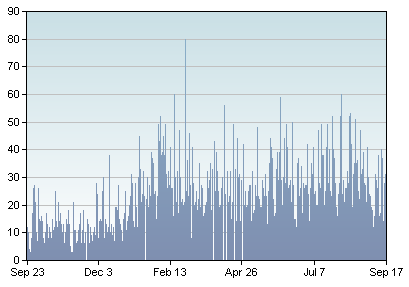
You can see in the following technorati graph the increase in its use (this one is for the term ‘link bait’) in the blogs that they track over the past 360 days
Link-Bait
As the term is used more and more I’ve also noticed an interesting debate emerge among bloggers (and search engine optimization types) over the idea of ‘link baiting’ and whether it’s a good thing or not. Some SEO companies have started to offer link baiting services while others are against the idea and believe that the benefits of link baiting are the same benefits of good web practices. 

As the term’s crept into blogging more and more over the past months I thought it might be a good topic for a series. 

Over the next few days I’ll be writing a series of posts covering:
  • What is Link Baiting?
  • Is Link Bait bad?
  • What are the Benefits of Linkbaiting?
  • What types of Linkbait are there?
  • Techniques and strategies for Good link baiting
I’m sure I’ll cover more ground as we go along – but lets start with the first couple.

‘What is Link Baiting?’

A lot could (and has been) said about it. So I’ll make just a few basic points to keep things simple. 

The term linkbaiting is a one that seems to have surfaced over the past 12 or so months and that is used by webmasters to describe a variety of practices – all of which seek to generate incoming links to a website or blog from other sites. 

It is actually a difficult term to be definative about as it covers a lot of different practices ranging from running awards or competitions, through to writing attacking posts on high profile bloggers in the hope of them biting back and linking to you, through to providing other bloggers or site owners with tools (with embedded links back to your own site) that they can put on their blogs (we’ll run through more linkbaiting techniques in one of my next posts in this series).

In reality the term ‘linkbaiting’ is a new term for something that webmasters have been doing for many years. From my earliest days of blogging four years ago I know I saw people doing lots of things to get links (even though the term was never used).

Is Linkbaiting Good or Bad?

Linkbaiting is often written about in negative terms. I regularly see people writing off a post that others have written or a comment others have left as ‘just being linkbait’. 

I personally don’t like the term ‘linkbaiting’ on some levels as it does seem to have negative connotations. ‘Baiting’ has a sense of trying to trick or trap an unsuspecting person or thing into doing something that they don’t really want to do. While this is accurate with some forms of linkbaiting it is not true with others. 

There is a lot of debate around both the term ‘linkbaiting’ and some of the practices that people talk about it incorporating. Some argue strongly that it is just a by-product of quality content, others argue that many linkbaiting strategies border on spam, others seem to talk about linkbait as being the answer to all web promotional problems (increasingly SEO companies are offering linkbaiting services). 

My own opinion on whether link bait is good or bad is that it depends upon the type of link baiting that you’re talking about. I think some techniques that people use are just good standard blogging techniques – while other things that people do in the pursuit of links are destructive to the blogging community and I’d argue against them. 

Like almost anything online, people use linkbaiting strategies for good and healthy purposes but also for dubious and ‘evil’. I guess in part we each need to think about our priorities, values and even ethics as we go about our blogging and explore this topic.

Have Your Say

  • How would you define link baiting?
  • What has been your experience of it?
  • Would you consider it to be good, bad or some combination of each?

Courtesy :  http://www.problogger.net/archives/2006/09/19/an-introduction-to-linkbaiting/

Thoughts and Facts about Keyword Density

What is the right keyword density? Do all search engines like same keyword density? How to avoid keyword overstuffing penalties? All this questions are answered in this article. Moreover, you will get some additional thoughts and points over keyword theory. Get involved! Keyword density as an optimization unit. Keyword density is a correlation of quantity of all words on your page with quantity of keywords. Keyword density is usually expressed in percents. For instance if you have 100 words and seven of them are keywords – your page’s keyword density is 7%. Keyword density is always measured per-page, never per site, because search engines consider a page to be the smallest independent unit. What keyword density is allowed by search engines? All search engines have a lot of

criteria to measure a web page. Keyword density is one of them and it is one of appreciable ones. Search engine algorithms are complicated mathematical measures and each search engine has it’s own – that is why allowed keyword density can vary for different search engines. If you are targeting one search engine – you can try to find out it’s allowed keyword density and keep it. If you target two or more – keep minimal keyword density allowed by one of them. What are actually keywords and how search engines find out what are keywords on my page? We know that keywords are search terms we seek, but a search engine doesn’t knows what keywords have you actually installed in your web page, unless you list them in META keywords tag (however, it is more like that the majority of search engines ignore this tag). So how do I count keyword density. Count the maximum repeating words! Even if your site is about apples, but there are more “garden” words – search engine will count maximal quantity of similar words. This means that you have a total of 100 words, 10 of which are “apple” and 30 of them are “garden”, you can get penalized for “garden” word. Note that articles, pronouns and other keyword-neutral words are not counted as keywords. The most convenient way to get full keyword analysis of your page is to use appropriate software. There are a lot of free and pay keyword analysis tools online. There are another significant notion in counting keyword density of a page – keyword phrase. You know that some keywords consist of two words – product names, geographical names, etc. Search engine algorithm is also looking keyword phrases, which are defined by finding repeating keyword phrases. Clear? I hope so. How do I count up right keyword density? It is a unique way of research for each webmasters. Yes, there are some commonly known recommendations, but during last two years I’ve heard more than hundred numbers of “right” keyword density. Create a couple of page with different keyword density and optimize ‘em in the same way (this doesn’t means creating a couple of identical pages with different keyword density, because you will trigger duplicate content filter doing so) and see the results. Sometimes it takes many time to find out the right value. Some of my sites are under 10% limit, some have no more than 5% - you will find your best quantity soon, trust me. However, there are some variables which can influence allowed keyword density – position of keywords. I believe that keywords in H1 are considered heavy, just as keywords in links text, keywords in “bold” tag and those, which are placed close to the beginning of the document. That is why there is no definite quantity of keyword density.

source: http://searchenginejournal.org/thoughts-and-facts-about-keyword-density.html

Linkedin for Business USE


  1. Fill out your profile completely to earn trust.
  2. Establish a business account if you don’t already have one.
  3. Stay out of trouble by reading the Facebook rules regarding business accounts.
  4. Install appropriate applications to integrate feeds from your blog and other social media accounts into your Facebook profile. (Although you should be careful before integrating your Twitter feed into your Faceboook profile, as a stream of tweets can seem overwhelming to your contacts.)
  5. Keep any personal parts of your profile private through Settings.
  6. Create friends lists such as “Work,” “Family” and “Limited Profile” for finer-grained control over your profile privacy.
  7. Post a professional or business casual photos of yourself to reinforce your brand.
  8. Limit business contacts’ access to personal photos.
  9. Post your newsletter subscription information and archives somewhere in your profile.
Connect and share with others
  1. Obtain a Facebook vanity URL so that people can find you easily.
  2. Add your Facebok URL to your email signature and any marketing collateral (business cards, etc.) so prospects can learn more about you.
  3. Post business updates on your wall. Focus on business activities, such as “Working with ABC Company on web site redesign.”
  4. Share useful articles and links to presentation and valuable resources that interest customers and prospects on your wall, to establish credibility.
  5. Combine Facebook with other social media tools like Twitter. For example, when someone asks question on Twitter, you can respond in detail in a blog post and link to it from Facebook.
  6. Before traveling, check contacts locations so you can meet with those in the city where you’re heading.
  7. Research prospects before meeting or contacting them.
  8. Upload your contacts from your email client to find more connections.
  9. Use Find Friends for suggestions of other people you may know to expand your network even further.
  10. Look for mutual contacts on your contacts’ friends lists.
  11. Find experts in your field and invite them as a guest blogger on your blog or speaker at your event.
  12. Market your products by posting discounts and package deals.
  13. Share survey or research data to gain credibility.
  14. Use Facebook Connect to add social networking features to your web site.
  15. Suggest Friends to clients and colleagues — by helping them, you establish trust.
  16. Buy Facebook ads to target your exact audience.
  17. Read up on Facebook Beacon to see if it might be useful for you.
Use Network, Group and Fan Pages
  1. Start a group or fan page for product, brand or business. Unless you or your business is already a household name, a group is usually the better choice.
  2. Add basic information to the group or fan page such as links to company site, newsletter subscription information and newsletter archives.
  3. Post upcoming events including webinars, conferences and other programs where you or someone from your company will be present.
  4. Update your group or fan page on a regular basis with helpful information and answers to questions.
  5. Join network, industry and alumni groups related to your business.
  6. Use search to find groups and fan pages related to your business by industry, location and career.


    source:http://gigaom.com/collaboration/33-ways-to-use-linkedin-for-business/

50 Ideas on Using Twitter for Business

First Steps

   1. Build an account and immediate start using Twitter Search to listen for your name, your competitor’s names, words that relate to your space. (Listening always comes first.)
   2. Add a picture. ( Shel reminds us of this.) We want to see you.
   3. Talk to people about THEIR interests, too. I know this doesn’t sell more widgets, but it shows us you’re human.
   4. Point out interesting things in your space, not just about you.
   5. Share links to neat things in your community. ( @wholefoods does this well).
   6. Don’t get stuck in the apology loop. Be helpful instead. ( @jetblue gives travel tips.)
   7. Be wary of always pimping your stuff. Your fans will love it. Others will tune out.
   8. Promote your employees’ outside-of-work stories. ( @TheHomeDepot does it well.)
   9. Throw in a few humans, like RichardAtDELL, LionelAtDELL, etc.
  10. Talk about non-business, too, like @aaronstrout and @jimstorer.

Ideas About WHAT to Tweet

  11. Instead of answering the question, “What are you doing?”, answer the question, “What has your attention?”
  12. Have more than one twitterer at the company. People can quit. People take vacations. It’s nice to have a variety.
  13. When promoting a blog post, ask a question or explain what’s coming next, instead of just dumping a link.
  14. Ask questions. Twitter is GREAT for getting opinions.
  15. Follow interesting people. If you find someone who tweets interesting things, see who she follows, and follow her.
  16. Tweet about other people’s stuff. Again, doesn’t directly impact your business, but makes us feel like you’re not “that guy.”
  17. When you DO talk about your stuff, make it useful. Give advice, blog posts, pictures, etc.
  18. Share the human side of your company. If you’re bothering to tweet, it means you believe social media has value for human connections. Point us to pictures and other human things.
  19. Don’t toot your own horn too much. (Man, I can’t believe I’m saying this. I do it all the time. – Side note: I’ve gotta stop tooting my own horn).
  20. Or, if you do, try to balance it out by promoting the heck out of others, too.

Some Wisdom For You

  21.  You don’t have to read every tweet.
  22. You don’t have to reply to every @ tweet directed to you (try to reply to some, but don’t feel guilty).
  23. Use direct messages for 1-to-1 conversations if you feel there’s no value to Twitter at large to hear the conversation ( got this from @pistachio).
  24. Use services like Twitter Search to make sure you see if someone’s talking about you. Try to participate where it makes sense.
  25. 3rd party clients like Tweetdeck and Twhirl make it a lot easier to manage Twitter.
  26. If you tweet all day while your coworkers are busy, you’re going to hear about it.
  27. If you’re representing clients and billing hours, and tweeting all the time, you might hear about it.
  28. Learn quickly to use the URL shortening tools like TinyURL and all the variants. It helps tidy up your tweets.
  29. If someone says you’re using twitter wrong, forget it. It’s an opt out society. They can unfollow if they don’t like how you use it.
  30. Commenting on others’ tweets, and retweeting what others have posted is a great way to build community.

The Negatives People Will Throw At You

  31. Twitter takes up time.
  32. Twitter takes you away from other productive work.
  33. Without a strategy, it’s just typing.
  34. There are other ways to do this.
  35. As Frank hears often, Twitter doesn’t replace customer service (Frank is @comcastcares and is a superhero for what he’s started.)
  36. Twitter is buggy and not enterprise-ready.
  37. Twitter is just for technonerds.
  38. Twitter’s only a few million people. (only)
  39. Twitter doesn’t replace direct email marketing.
  40. Twitter opens the company up to more criticism and griping.

Some Positives to Throw Back

  41. Twitter helps one organize great, instant meetups (tweetups).
  42. Twitter works swell as an opinion poll.
  43. Twitter can help direct people’s attention to good things.
  44. Twitter at events helps people build an instant “backchannel.”
  45. Twitter breaks news faster than other sources, often (especially if the news impacts online denizens).
  46. Twitter gives businesses a glimpse at what status messaging can do for an organization. Remember presence in the 1990s?
  47. Twitter brings great minds together, and gives you daily opportunities to learn (if you look for it, and/or if you follow the right folks).
  48. Twitter gives your critics a forum, but that means you can study them.
  49. Twitter helps with business development, if your prospects are online (mine are).
  50. Twitter can augment customer service. (but see above)

source:http://www.chrisbrogan.com/50-ideas-on-using-twitter-for-business/

Thursday, September 23, 2010

Increase Blog Traffic


Simple 10 ways to increase traffic

1.       Get Registered with FreeTrafficSystem.com to get targeted traffic from the search engines. It is great way to increase blog traffic.

2.       Create an account at Trafficswarm.com & start surfing your Trafficswarm page and view only the sites that interest you.

3.       Start submitting your blog URL to as many blog & RSS directories. You may also find some directories at http://earnbonus.com/feed-directories/

4.       Open an account at mybloglog.com. Post your blog then make friends & join the communities. This is a great way to increase blog traffic.

5.       Stumbleupon.com a great social networking website. Get registered & make friends. You can then stubmle your post.

6.       Go to Socialposter.com & Fill all required information like exact URL, title, general summary and tags for your blog. After that submit your blog details as many social sites.

7.       Signup with technorati.com & add your blog them ping it when you update.

8.       Add your blog URL to your forum signature. This is a attractive way to get traffic especially from quality forum posts.

9.        Find one of the top bloggers in your niche then write a good review post of them. Let them know and they will probably link back to you.

10.   Add a link at Squidoo.com by creating a new account an. And make a lens & add your blog link.

  This all are easiest way to Increase your blog Traffic.

Thank you…

Ways To Ensure Good Rankings In Google Instant

Google Instant has kiiled Seo,  are the rumors being spread . But it is not true, it has only changed the way search engine marketers must take in order to get the websites placed in top of search engines. So here, are some of tips for effective ranking in Google Instant

1. Include a Keyword in Your Brand Name:
   Get primary keyword in brand name and you would see yourself half way as the first results of first keyword is entered into searches will affect a lot of visitors with brand domination if its in top results of Google.

2.  Start Thinking Like Searchers Think
  You have to start thinking the way searches think to make sure that the site is optimized for keywords with the potential visitors starting to think.  You need to think that what would be the first word users would think when looking out for you.


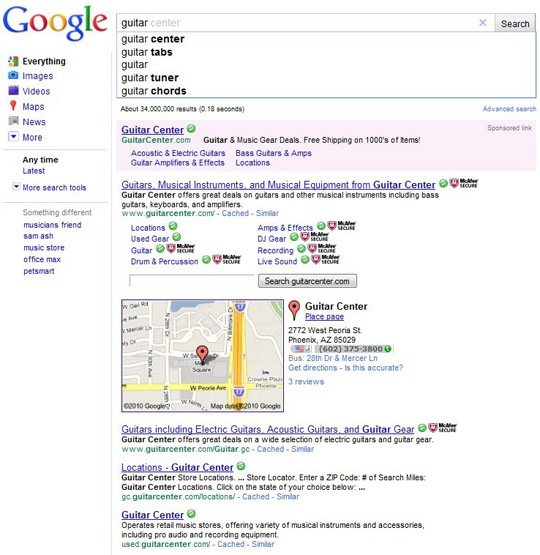
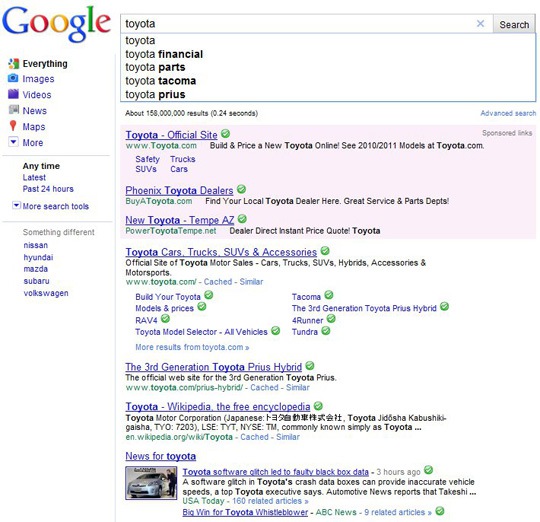
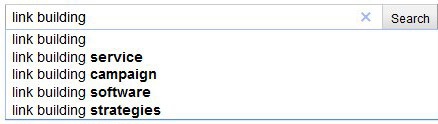
3. Include Google Suggest as a Keyword Research Tool:
    Highlighting a Google suggested term is definitely important as it will bring instant results with terms targeting that come up for the most important primary word.
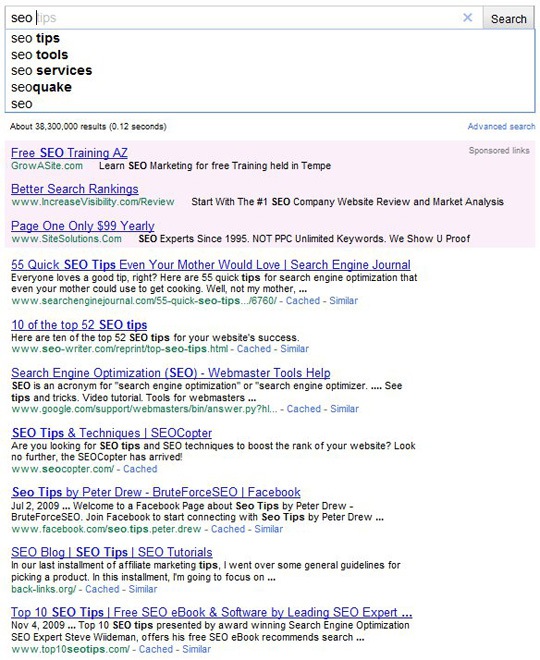
For some cases, taking a tailored keyword would be feasible solution as typing in SEO Google suggest
would come out with various other options like SEO Tips putting SEO at the bottom of searches


4. Get Locally Optimized for Generic Keywords
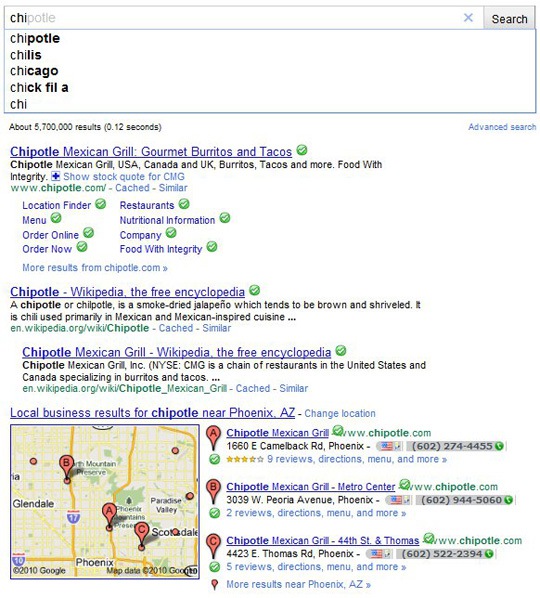
If the business has local physical locations for one or more regions, it is the time to apply local search marketing techniques to the website & brand which would make 73% of searches for local content so that the business comes up instantly in search engines.

  
5. Make Sure Your Online Reputation Is Good

    One needs to always ensure that online reputation for the brand is good. If someone looking for a brand have some negative entries there might be chances that they get tempted to search for competitiors.
By having positive online presence, with the help of social media profiles, blogs & social bookmarking one would be able to push down negative effects of the site making good impression in top of search results.

6. Domination of  Search Results With MultiMedia:
When someone wants to get popularted in search engines one need to produce variety of content, with assurance that when someone types in your name/brand they may find only you.

source:http://www.searchenginejournal.com/6-ways-to-ensure-better-rankings-in-google-instant/24213/