First Steps
1. Build an account and immediate start using Twitter Search to listen for your name, your competitor’s names, words that relate to your space. (Listening always comes first.)
2. Add a picture. ( Shel reminds us of this.) We want to see you.
3. Talk to people about THEIR interests, too. I know this doesn’t sell more widgets, but it shows us you’re human.
4. Point out interesting things in your space, not just about you.
5. Share links to neat things in your community. ( @wholefoods does this well).
6. Don’t get stuck in the apology loop. Be helpful instead. ( @jetblue gives travel tips.)
7. Be wary of always pimping your stuff. Your fans will love it. Others will tune out.
8. Promote your employees’ outside-of-work stories. ( @TheHomeDepot does it well.)
9. Throw in a few humans, like RichardAtDELL, LionelAtDELL, etc.
10. Talk about non-business, too, like @aaronstrout and @jimstorer.
Ideas About WHAT to Tweet
11. Instead of answering the question, “What are you doing?”, answer the question, “What has your attention?”
12. Have more than one twitterer at the company. People can quit. People take vacations. It’s nice to have a variety.
13. When promoting a blog post, ask a question or explain what’s coming next, instead of just dumping a link.
14. Ask questions. Twitter is GREAT for getting opinions.
15. Follow interesting people. If you find someone who tweets interesting things, see who she follows, and follow her.
16. Tweet about other people’s stuff. Again, doesn’t directly impact your business, but makes us feel like you’re not “that guy.”
17. When you DO talk about your stuff, make it useful. Give advice, blog posts, pictures, etc.
18. Share the human side of your company. If you’re bothering to tweet, it means you believe social media has value for human connections. Point us to pictures and other human things.
19. Don’t toot your own horn too much. (Man, I can’t believe I’m saying this. I do it all the time. – Side note: I’ve gotta stop tooting my own horn).
20. Or, if you do, try to balance it out by promoting the heck out of others, too.
Some Wisdom For You
21. You don’t have to read every tweet.
22. You don’t have to reply to every @ tweet directed to you (try to reply to some, but don’t feel guilty).
23. Use direct messages for 1-to-1 conversations if you feel there’s no value to Twitter at large to hear the conversation ( got this from @pistachio).
24. Use services like Twitter Search to make sure you see if someone’s talking about you. Try to participate where it makes sense.
25. 3rd party clients like Tweetdeck and Twhirl make it a lot easier to manage Twitter.
26. If you tweet all day while your coworkers are busy, you’re going to hear about it.
27. If you’re representing clients and billing hours, and tweeting all the time, you might hear about it.
28. Learn quickly to use the URL shortening tools like TinyURL and all the variants. It helps tidy up your tweets.
29. If someone says you’re using twitter wrong, forget it. It’s an opt out society. They can unfollow if they don’t like how you use it.
30. Commenting on others’ tweets, and retweeting what others have posted is a great way to build community.
The Negatives People Will Throw At You
31. Twitter takes up time.
32. Twitter takes you away from other productive work.
33. Without a strategy, it’s just typing.
34. There are other ways to do this.
35. As Frank hears often, Twitter doesn’t replace customer service (Frank is @comcastcares and is a superhero for what he’s started.)
36. Twitter is buggy and not enterprise-ready.
37. Twitter is just for technonerds.
38. Twitter’s only a few million people. (only)
39. Twitter doesn’t replace direct email marketing.
40. Twitter opens the company up to more criticism and griping.
Some Positives to Throw Back
41. Twitter helps one organize great, instant meetups (tweetups).
42. Twitter works swell as an opinion poll.
43. Twitter can help direct people’s attention to good things.
44. Twitter at events helps people build an instant “backchannel.”
45. Twitter breaks news faster than other sources, often (especially if the news impacts online denizens).
46. Twitter gives businesses a glimpse at what status messaging can do for an organization. Remember presence in the 1990s?
47. Twitter brings great minds together, and gives you daily opportunities to learn (if you look for it, and/or if you follow the right folks).
48. Twitter gives your critics a forum, but that means you can study them.
49. Twitter helps with business development, if your prospects are online (mine are).
50. Twitter can augment customer service. (but see above)
source:http://www.chrisbrogan.com/50-ideas-on-using-twitter-for-business/
Saturday, September 25, 2010

Thursday, September 23, 2010
Increase Blog Traffic
Simple 10 ways to increase traffic
1. Get Registered with FreeTrafficSystem.com to get targeted traffic from the search engines. It is great way to increase blog traffic.
2. Create an account at Trafficswarm.com & start surfing your Trafficswarm page and view only the sites that interest you.
3. Start submitting your blog URL to as many blog & RSS directories. You may also find some directories at http://earnbonus.com/feed-directories/
4. Open an account at mybloglog.com. Post your blog then make friends & join the communities. This is a great way to increase blog traffic.
5. Stumbleupon.com a great social networking website. Get registered & make friends. You can then stubmle your post.
6. Go to Socialposter.com & Fill all required information like exact URL, title, general summary and tags for your blog. After that submit your blog details as many social sites.
7. Signup with technorati.com & add your blog them ping it when you update.
8. Add your blog URL to your forum signature. This is a attractive way to get traffic especially from quality forum posts.
9. Find one of the top bloggers in your niche then write a good review post of them. Let them know and they will probably link back to you.
This all are easiest way to Increase your blog Traffic.
Thank you…
Ways To Ensure Good Rankings In Google Instant
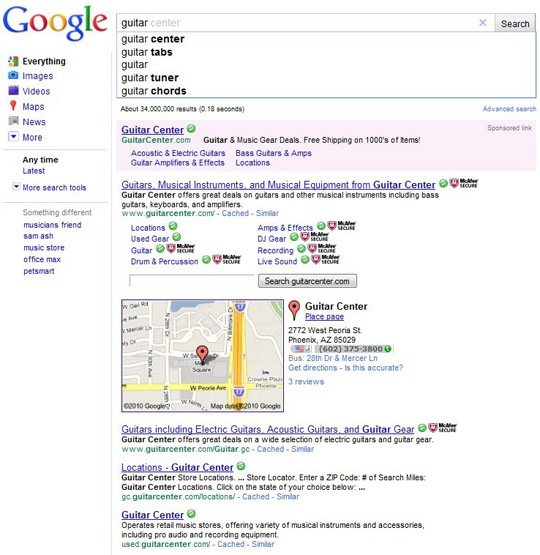
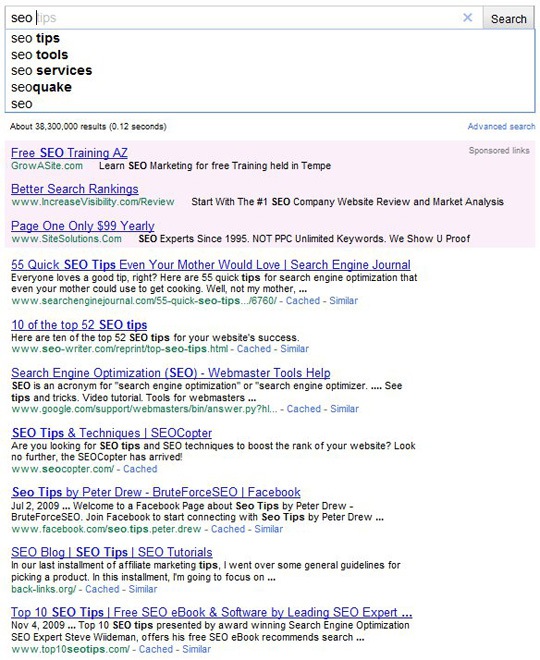
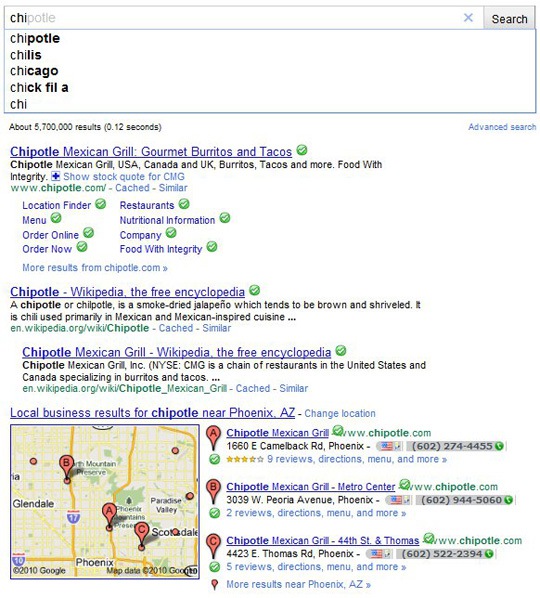
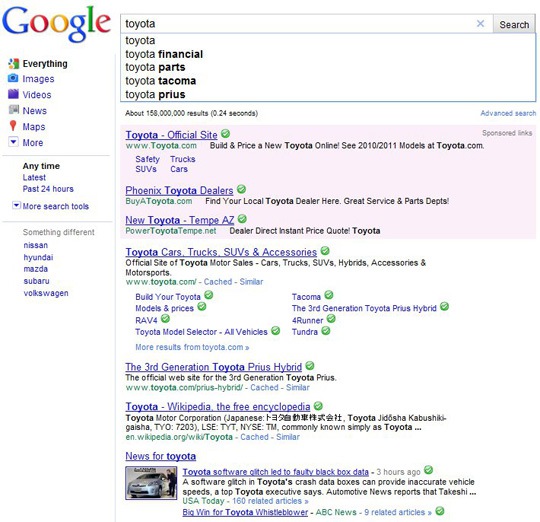
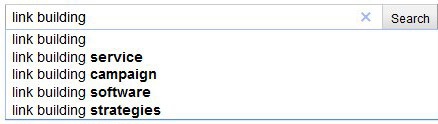
Google Instant has kiiled Seo, are the rumors being spread . But it is not true, it has only changed the way search engine marketers must take in order to get the websites placed in top of search engines. So here, are some of tips for effective ranking in Google Instant
Saturday, September 18, 2010
Build a Facebook Landing Page for Your Business
What is FBML?
FBML is Facebook’s version of HTML, This particular application, which was created by Facebook and can be added to your pages, allows you to create a “web page” within a tab or box that you can attach to your page.
How do find the Static FBML application and install it?
Like any other application, Static FBML can be found by using the search on Facebook. Simply type in: Static FBML.

In the results list you will find listings for both Applications and Pages. You are looking for the Application so click on that.
Once you’re on the page for the Static FBML application, you will look for the link to “add application to my page” which should be at the top left of the screen, under the logo for the application.

Clicking the link brings up a popup window which allows you to select the page you’d like to add it to

After you have added the app, pull up your Facebook fan page. Now you have a new tab called “FBML” on your page but it is blank. To edit FBML click on “Edit Page” of your fan page.

In list of application find the Static-FBML and click on “Edit” to add content to FBML Page.

After getting the Editing mode two boxes will appears “Box Title” & “FBML”. In Box Title give name for your FBML TAB and at FBML add Html Content which will display as a static page at FBML TAB.

Save the changes and go to your fan page. The FBML TAB will appear with given title to FBML box. To set it as a landing page just click on “Setting” tab at your page wall. You will find drop down box named “Default Landing Tab for Everyone Else”. From the list select FBML tab. That’s all.

After completing this Process the FBML Tab will appear first whenever your fan page will open. See how easy is this!
‘Ways for Improving Google Page Rank’
1) Make sure that at least one link to Google. They need the quality traffic as well. Do not be greedy and hog everything for you. This is not surprising the pages. Remember - Google is about - so that more traffic will send him best.
2) Use invisible text, but its close - such as paints and 00FF33 00FF66 made both secure browser, but as most people can not tell the difference is close. While Google is more than 50 staff doctors - none of them perhaps - it then use it know
3) Dots, Dots, and more points. Place the bottom of your document will look like this:
.............
Then link each of your pages - be sure to link with one of Google and Yahoo for another good measure. Do not link to other sites worldwide (excluding your own), not search engines. Not even link to a page where the previous search engines - like AltaVista.
4) H1 tags used all throughout your site (other than the title and header information). You can use CSS to make them smaller, and Google gives you all for making top bookoo great (even if it does not look great, the user).
5) If all else fails - Almost 10 wrapped in spot number 10 envelope (at least one aluminum layer or foil wrap around it). Enter the URL above, the serial number on the front panel. If not match, then this problem - if Google likes long URLs.
6) Do not copy content from another site. Even if you are copying and republishing your own content of a page or site to another, do not. Google's algorithm can not make a difference and provide either the original site and credit downgrade or other downgrading all sites that publish duplicate content. Google acts harshly towards any type of scraping content, even if you are totally innocent. Once your page rank is demoted, it is nearly impossible to recover again.
7) Use the Meta keyword tag too. With commas mechanism. Make sure the words you more than three times in a row, so be sure not to repeat. Google only document the first 101k indexes - do not use too many.
8) This recommendation is without doubt the most powerful here. Make at least three pages on your site and link as follows:
Page 1 >>>>>> Page 2
>>>>>> Page 2 Page 3
And the kicker
1 page 3 >>>>>> Page
The following pages on Google, that page 3-2 pages 2-1 pages will give you the points - again, if you link to a page - everything will start again. How many points can not count to the end of the week? Just do not abuse it too much - or a site to promote as many of them to complain.
2) Use invisible text, but its close - such as paints and 00FF33 00FF66 made both secure browser, but as most people can not tell the difference is close. While Google is more than 50 staff doctors - none of them perhaps - it then use it know
3) Dots, Dots, and more points. Place the bottom of your document will look like this:
.............
Then link each of your pages - be sure to link with one of Google and Yahoo for another good measure. Do not link to other sites worldwide (excluding your own), not search engines. Not even link to a page where the previous search engines - like AltaVista.
4) H1 tags used all throughout your site (other than the title and header information). You can use CSS to make them smaller, and Google gives you all for making top bookoo great (even if it does not look great, the user).
5) If all else fails - Almost 10 wrapped in spot number 10 envelope (at least one aluminum layer or foil wrap around it). Enter the URL above, the serial number on the front panel. If not match, then this problem - if Google likes long URLs.
6) Do not copy content from another site. Even if you are copying and republishing your own content of a page or site to another, do not. Google's algorithm can not make a difference and provide either the original site and credit downgrade or other downgrading all sites that publish duplicate content. Google acts harshly towards any type of scraping content, even if you are totally innocent. Once your page rank is demoted, it is nearly impossible to recover again.
7) Use the Meta keyword tag too. With commas mechanism. Make sure the words you more than three times in a row, so be sure not to repeat. Google only document the first 101k indexes - do not use too many.
8) This recommendation is without doubt the most powerful here. Make at least three pages on your site and link as follows:
Page 1 >>>>>> Page 2
>>>>>> Page 2 Page 3
And the kicker
1 page 3 >>>>>> Page
The following pages on Google, that page 3-2 pages 2-1 pages will give you the points - again, if you link to a page - everything will start again. How many points can not count to the end of the week? Just do not abuse it too much - or a site to promote as many of them to complain.
Effective Link Building Tips
These link building techniques are potential to assure that you will receive free links from already established websites. These are different from the content-oriented development strategies and provide one-way organic links.
Case 1
Submit your site to Web Directories - This monotonous process can be helpful to get you several back-links.
Submit Press Releases to PR Sites – A good way to get a free link; several PR websites will distribute your website/product/service/event/much-more….lunching details to various online news outlets.
Reciprocal Links with Similar Websites - Reciprocal linking can be useful from the beginning; it’s important to choose highly relevant websites to bring not only back-links but traffic also.
Web 2.0 Pages - It’s help you to insert a bunch of anchor text links to your website along with your feed content. E.g. Squidoo lens, Hubpages
Article Submissions – Create an article using rich content on your niche topic & submit it to article directories to generate back-link as well as traffic.
Social Media Profiles - There a whole bunch of social websites online which allow you to insert a link to your website on the profile page. Social sites online profile page, that you have a link on its website a whole bunch of permits out there. Sign up for some of them, preferably with a username and an avatar that your company, brand. It comes in handy if you could in the future through social sites to promote your site to decide. E.g. Twitter, Facebook
Social Bookmarking Websites - Social bookmarking websites are often crawled by search engines and their links can help to get a website indexed soon. E.g. Netscape or Digg
Forum Signatures - Sign up for some forums in your niche and start contributing to ongoing discussions & insert the homepage or some inner page’s link of your site as a signature.
CASE 2
Create a Tool, Theme or Widget - Make an add-on application or template related to social networking website or platform & include a credit link that points back to your designated website.
Blogs on Other Blog Platforms – Set up your blog on different blog networks which link to specific WebPages on your website like WordPress.com, Blogger and Xanga.
Comment on Other Blogs - Start commenting on relevant and popular sites in your niche and try to avoid keyword names or signature links.
Guest posting on other blogs – Send your article and press releases to certain blogs in your niche which will help you to get relevant links and traffic.
Hold Contests - Some websites often offer contests in a bid to attract anchor text links from bloggers. The contests allow you to establish the specific anchor text.
Collaborative Projects - Originate an article specifically for a writing project, or blog carnival; and depends on the number and generousness of the participants involved; it will give you a couple of back-links.
Offer your Expertise – Use your specific skill such as web design, copywriting, translation or SEO and offers excellent branding and take credit link for your Webpage.
Top 10 Internet Marketing Strategies
Internet marketing can attract more people to your website, increase customers for your business, and enhance branding of your company and products. If you are just beginning your online marketing strategy the top 10 list below will get you started on a plan that has worked for many.
source: http://marketing.about.com/od/internetmarketingstrategy/a/internettips.htm
- Start with a web promotion plan and an effective web design and development strategy.
- Get ranked at the top in major search engines, and practice good Search Optimization Techniques.
- Learn to use Email Marketing Effectively.
- Dominate your marketing niche with affiliate, reseller, and associate programs.
- Request an analysis from an Internet marketing coach or Internet marketing consultant.
- Build a responsive opt-in email list.
- Publish articles or get listed in news stories.
- Write and publish online press releases.
- Facilitate and run contests and giveaways via your web site.
- Blog and interact with your visitors.
source: http://marketing.about.com/od/internetmarketingstrategy/a/internettips.htm
11 Free Tools for Social Media Optimization
Plenty of bloggers are talking about the inevitable intersection of social media marketing and search engine optimization. Heck, we’ve beenblogging about SMO since 2006! Keyword optimized social content and channels of promotion provide abundant signals to search engines for improved visibility on standard, social and real-time search.
The changing nature of social media marketing and optimization create the need for tools whether for research, marketing and promotion or analytics. Here are 11 social media and SEO tools you might find useful:
- howsociable.com – Social visibility score
- knowem.com – Profile building tool
- Social Media for Firefox – Build a powerful social profile on social news & bookmarking sites
- semrush.com – Find competitor organic search rankings
- Google Insights – Keyword demand trends
- Page Inlink Analyzer – Analyze inbound links, their Delicious bookmarks & keyword tags
- majesticseo.com – Historical back-link tracking
- trackur.com – Social media monitoring
- socialmention.com – Real-time social search & scoring, social keyword research
- bit.ly – Search friendly URL shortening with analytics
- analytics.postrank.com – Track social engagement with combined Google & social analytics
Below are screen shots of each tool with a more detailed description of how you might use them.
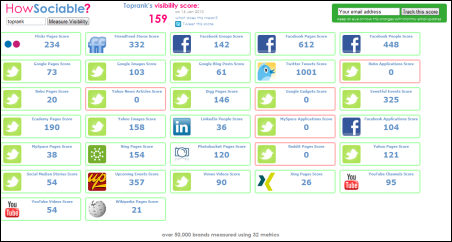
HowSociable is a useful tool to quickly gauge the social presence of a particular keyword or brand name. Agencies like TopRank Marketing will use this kind of tool (customized) to take snapshots of customer social presence metrics for social media optimization programs. For each social site polled, you can clickthrough to see specific mentions. This is a characteristic of more advanced social media monitoring tools, but for those that want a quick glimpse, HowSocialble is easy to use and the price is right, just like these free social media monitoring tools. However, if you want more comprehensive brand search and monitoring, then a paid social media measurement tool is worth the investment.
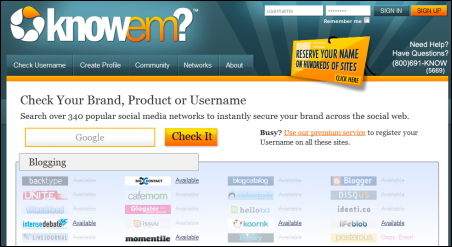
KnowEm is both a free and a paid service that will help you easily and quickly check whether your brand terms or other keywords have been registered as social profiles on a wide variety of social media web sites. Everything from blogging platforms to social news and bookmarking services are included. If you don’t want to complete all those profiles yourself, you can pay knowem to do it for you. Companies invest a lot in building their brand, so this tool is helpful both for creating off site promotion channels as well as guarding against brand name squatters.
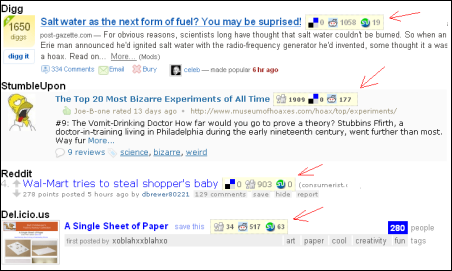
Social Media for Firefox is the only browser addon in our list and can be a handy tool to identify upcoming news items that are gaining popularity on certain social news and bookmarking services. A big part of building a more influential user profile is to be a consistent source of submissions for articles that become popular. This addon helps identify articles that are becoming popular on services like Digg, Reddit and StumbleUpon giving you a heads up to submit to other services. The logic is that if a news item becomes popular on one service it has a good chance of becoming popular on others. Relevance, timing and focus are key as is patience for this kind of tactic.
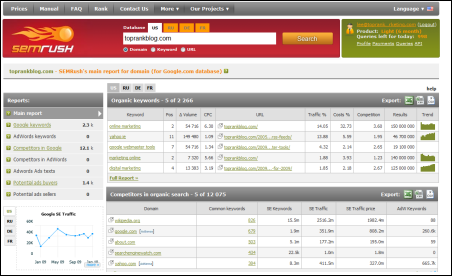
SEMRush is an interesting tool for identifying the keyword visibility, both organic and PPC, on Google for pretty much any domain name you might be curious about. Your own or competitors for example. A common question for marketers is, “What are my competitors optimizing for?”. This tool helps uncover that insight and in combination with other standard and social keyword research, can be very helpful insight in a social media optimization program.
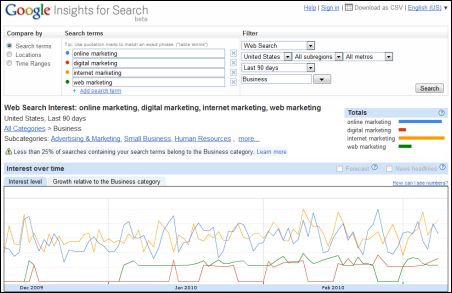
Google Insights for Search is a handy tool to research trends in popularity of various keywords on their own or in combination. Filters for search type, geographic location, industry or topical category and timeframe allow you to refine some pretty useful information about what’s in demand.
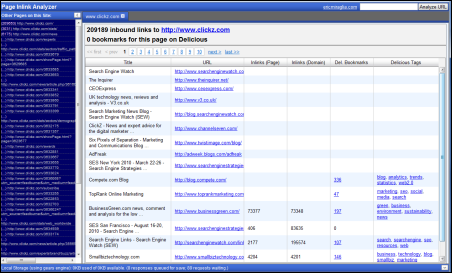
Eric Miraglia ‘s Inlink Analyzer is a back link analysis tool based on Yahoo’s Site Explorer that not only counts and displays source links to a particular URL, but it also shows if the source links were bookmarked on Delicious and what keyword tags were used. This kind of insight can be quite useful for understanding the relationship between social keywords and link popularity. It would be nice if there was a CSV export option.
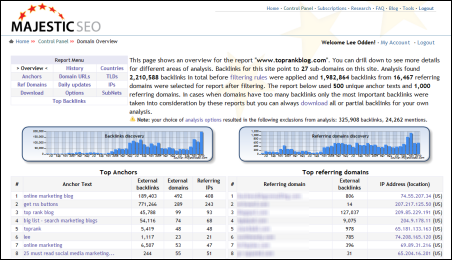
Majestic SEO is easily one of the most powerful and useful link analysis tools available. There is a free version that gives you link acquisition counts over time and if you are a site owner, you can get full reporting for your site once you validate it. If you use the paid service, you can get the juicy link details on your competition. This tools is useful for finding high impact links for standard SEO but it’s also useful for finding out which social media sites your site or competitors’ site are getting the most links from. Also, which of your own social destinations (blog, Facebook, Twitter, etc) are getting inbound links and from where.
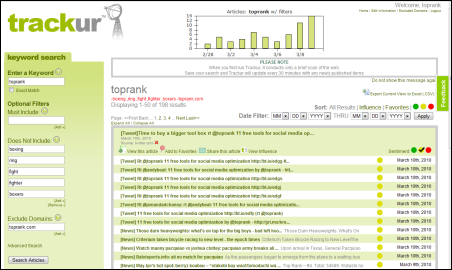
Andy Beal’s Trackur service is a very easy to use social media monitoring tool that offers a free version that will satisfy many beginners in the social media optimization space. Social media monitoring services are keyword based, (queries and negative or exclusionary) and that means some very useful information about how popular certain keyword concepts are on the social web. Of course you can use it to monitor what people are saying about your brand, identify a certain measure of influence and where they’re saying it. But seeing social keyword popularity trends can be quite useful for taking advantage of real-time marketing opportunities.
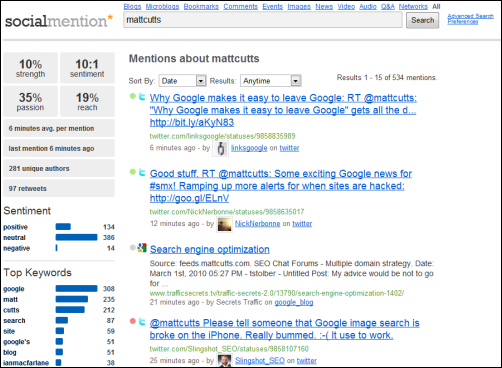
SocialMention is a free real time and social search tool that offers an array of search options (just blogs, just forums, just bookmarks or all) and output in the search results. You can get an indication of basic sentiment and the top social keywords associated with your query. As a free service, you don’t setup an account and save your search results, but you can easily download them into a spreadsheet. This is probably one of the most useful, free social search tools online.
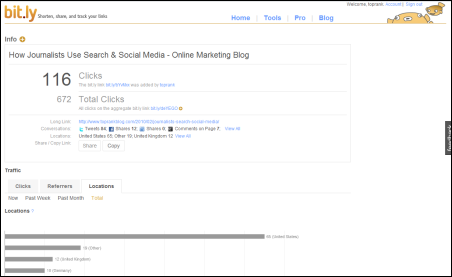
Bit.ly URL shortening is very handy since they’re included as a default service on Twitter and many other Twitter applications. Bit.ly is rock solid reliable with uptime, which is pretty critical when you’re relying on their URL redirect to send traffic to whatever it is you’re promoting. You can also get basic statistics for each URL that your shorten to show how productive the site is where it was shared. In today’s succinct social web with Twitter, status updates and micro-content, being able to conserve space with a reliable URL shortener is very helpful. Stats on top of that make this a “go to” URL shortening service.
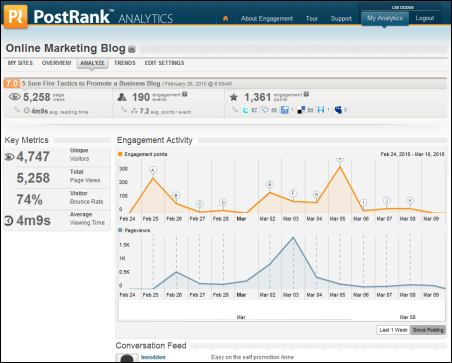
PostRank offers a nice measure of engagement at the individual document level and if you pay attention, you can get that data on any web site in their database, not just your own. You can easily see what content on your competitors blogs are getting popular and where. If you sign up for the PostRank Analytics service, you can incorporate Google Analytics data with social engagement metrics. These are essential comparisons in a social media optimization program and can help you understand where to plan your time on the social web.
This is really just the tip of the iceberg when it comes to SEO and Social Media Marketing tools. What low cost or free tools have you found to be effective for social media optimization tasks?
Social Networking and Blog Sites More Popular – 75% of online users
Social Networking and Blog Sites getting even more poular, social

network or blog sites are visited by 75% of online users, reports Nielson.
Despite a fast-growing net population, India due to its present
low numbers, fails to appear in the list of top 10 socially networked countries.
A comparable developing country Brazil has highest percentage (86%) of Internet consumers visiting a social network. The popularity of social networking in Brazil is due to the Orkut phenomenon, which continues to be strong there. In India, Orkut is steadily losing ground to Facebook.
A comparable developing country Brazil has highest percentage (86%) of Internet consumers visiting a social network. The popularity of social networking in Brazil is due to the Orkut phenomenon, which continues to be strong there. In India, Orkut is steadily losing ground to Facebook.
Social networking usage by country
Country
% Reach of Active Users
% Reach of Active Users
- Brazil - 86%
- Italy – 78%
- Spain - 77%
- Japan – 75%
- United States – 74%
- United Kingdom – 74%
- France – 73%
- Australia – 72%
- Germany – 63%
- Switzerland – 59%
Facebook has captured two-thirds of the active unique audience in Italy, making the site relatively more popular in Italy than in the three major English-speaking markets, Australia, the U.S. and the UK.
In contrast, Japanese people have the least appetite for Facebook, with reach and time spent markedly lower than in any of the other countries measured.
Facebook reach and usage by country
Country
% Reach of Active Users
% Reach of Active Users
- Italy - 66%
- Australia - 63%
- United States - 62%
- United Kingdom - 62%
- Spain - 57%
- France - 57%
- Switzerland - 45%
- Germany - 27%
- Brazil - 26%
- Japan - 3%
Sunday, August 29, 2010
Twitter Campaign Learning’s
We have been running a campaign on Twitter for the last couple of months for a client of ours. While I cannot go into specifics about the campaign, I can share some of our learning’s:
Build Credibility
There is nothing worse than a Twitter account that only tweets sales offers. Unless your name is Dell you cannot build a following that way.
What we have found is that the Twitter account has to tweet useful information. To do this we set up accounts on a program called EasyTweets. EasyTweets allows us to add some RSS feeds to our Twitter account. These RSS feeds pull in news from the niches that we are targeting. So anyone who follows our account, will get news that they are interested in.
What does that look like?
Well if I was a restaurant in Nashua NH, I would add RSS feeds of Nashua news to my feed as may target audience is people who live in, and around, Nashua.
What we found was that if we added local and industry news to our Twitter feeds, we were able to increase the number of followers that we had. And since the feeds we added were of interest to our target audience, we were able to add followers who were interested in what we were selling.
Don’t Oversell
We have found that if for our client that the optimal number of “sales tweets” was one to two a day. And since the Twitter accounts were sending out 10-15 tweets a day from the RSS feeds, our “sales tweets” blended into the overall stream and did not look like all we were doing is selling on Twitter.
Test Content
Just like testing Ad copy for PPC, test and retest your sales tweet content. It is amazing what a difference changing one word can do for your CTR. Also, test the time of day of your offers. Do they convert better in the morning or afternoon?
Use Hashtags
Hashtags (#mets for example) is an massively underused Twitter feature. There are a lot of portal type web sites now that run continuous twitter steams. For example Metsblog.com is aimed at New York Mets fans and averages 2.5 million page views every month in traffic, and is read by roughly 35,000 unique people every day. Metsblog.com has a twitter feed page on its site that pulls in Tweets that use the tag #mets.
So if your target audience is Mets fans, and you use the #mets tag in your tweets, then suddenly your tweet is getting exposed to 35,000 mets fans. Multiple that by the hundreds of Mets web sites that are online and suddenly your reach is much greater than the 1,000 followers that you have. Your tweets are now being seen and read by tens of thousands of people.
source: http://social-media-optimization.com/2010/07/twitter-campaign-learning%E2%80%99s/
Build Credibility
There is nothing worse than a Twitter account that only tweets sales offers. Unless your name is Dell you cannot build a following that way.
What we have found is that the Twitter account has to tweet useful information. To do this we set up accounts on a program called EasyTweets. EasyTweets allows us to add some RSS feeds to our Twitter account. These RSS feeds pull in news from the niches that we are targeting. So anyone who follows our account, will get news that they are interested in.
What does that look like?
Well if I was a restaurant in Nashua NH, I would add RSS feeds of Nashua news to my feed as may target audience is people who live in, and around, Nashua.
What we found was that if we added local and industry news to our Twitter feeds, we were able to increase the number of followers that we had. And since the feeds we added were of interest to our target audience, we were able to add followers who were interested in what we were selling.
Don’t Oversell
We have found that if for our client that the optimal number of “sales tweets” was one to two a day. And since the Twitter accounts were sending out 10-15 tweets a day from the RSS feeds, our “sales tweets” blended into the overall stream and did not look like all we were doing is selling on Twitter.
Test Content
Just like testing Ad copy for PPC, test and retest your sales tweet content. It is amazing what a difference changing one word can do for your CTR. Also, test the time of day of your offers. Do they convert better in the morning or afternoon?
Use Hashtags
Hashtags (#mets for example) is an massively underused Twitter feature. There are a lot of portal type web sites now that run continuous twitter steams. For example Metsblog.com is aimed at New York Mets fans and averages 2.5 million page views every month in traffic, and is read by roughly 35,000 unique people every day. Metsblog.com has a twitter feed page on its site that pulls in Tweets that use the tag #mets.
So if your target audience is Mets fans, and you use the #mets tag in your tweets, then suddenly your tweet is getting exposed to 35,000 mets fans. Multiple that by the hundreds of Mets web sites that are online and suddenly your reach is much greater than the 1,000 followers that you have. Your tweets are now being seen and read by tens of thousands of people.
source: http://social-media-optimization.com/2010/07/twitter-campaign-learning%E2%80%99s/
Social Networks and Recruiting
According to a survey by recruiting platform Jobvite nearly three-quarters of companies surveyed are using social networks for recruiting, and 58.1% said they had successfully hired a candidate found through a social network.

LinkedIn was the top social network looked to for hiring, used by nearly 80% of companies recruiting through social media. It also provided the most success, with about 90% of companies who had hired through a social network reporting they found the candidate on LinkedIn. While Facebook and Twitter were used for recruiting by about 55% and 45% of companies, respectively, they led to far fewer hires: 27.5% for Facebook and 14.2% for Twitter.
Success in this area is leading almost half of employers to increase recruiting program spending on social media. At the same time, more than a third of companies were lowering spending on job boards and search firms.

source:http://social-media-optimization.com/2010/08/social-networks-and-recruiting/
LinkedIn was the top social network looked to for hiring, used by nearly 80% of companies recruiting through social media. It also provided the most success, with about 90% of companies who had hired through a social network reporting they found the candidate on LinkedIn. While Facebook and Twitter were used for recruiting by about 55% and 45% of companies, respectively, they led to far fewer hires: 27.5% for Facebook and 14.2% for Twitter.
Success in this area is leading almost half of employers to increase recruiting program spending on social media. At the same time, more than a third of companies were lowering spending on job boards and search firms.
“While the economy begins to recover, companies looking to make new hires are seeking the most cost-effective, efficient ways to find new talent. As our third annual survey shows, social network recruiting has become a mainstream channel for employers who need access to talent,“ said Dan Finnigan, President and Chief Executive Officer of Jobvite. “Job boards launched a revolution in recruiting more than 15 years ago. And now, social networks are doing the same – but in a targeted way. Through social recruiting, companies are learning they can find the best talent efficiently, without making a major investment.“
source:http://social-media-optimization.com/2010/08/social-networks-and-recruiting/
Top Methods to Improve Your Blog Rank
Improve blog ranking and marketing is no longer kids stuff. It’s beyond the sappy diary entries and torment fueled rants. Its serious business, especially if your goal is to make money blogging for your business. Blog marketing is more dominant than static site marketing mainly because of all the options Web 2.0 offers. Below are some things you can do to take advantage of what web 2.0 has to offer to boost blog traffic, links and engine ranking.
1. Get exposed
Do you wonder how some large news and content sites deliver their headlines. Syndicate with RSS. While using the feed that comes with your blog may seem like an ok option, using a custom feed, that particularly separates keyword groups for content you develop often, is a far better option. Syndicating with RSS increases your exposure. Pheedpress, accessible from Content Desk is a great tool for this.
2. Tag you’re it!
Tags make it easier for people to find your blog post, and video and photos that are related. You can write the most informative blog in your niche but if it can not be found it can not get read. Tag your posts.
3. Social Bookmarking
Social Bookmarking allows users to save and categorize a personal collection of bookmarks and share them with others. Users may also take bookmarks saved by others and add them to their own collection, as well as to subscribe to the lists of others.
Bookmarking is an easy way to improve blog ranking and get traffic; the more you do it the more youll be noticed. Ideally, your site should be bookmarked somewhere in all the major bookmarking engines. For more details you can visit us at www.profit-pulling-tollbars.com. But having your entire site booked in just a few can greatly increase blog traffic.
4. Get involved
much like the tip above, adding comments is a great way to sprinkle your links around. Note however, your comment must be informative and relate to the original post. Bloggers will grant your trackbacks when your comments are on topic and useful.
5. Get connected
Social networks like Myspace can be found in nearly everywhere corner of the web. They are great places to meet like minded people and above all receive important links from.
Article syndication is still one of the most popular ways to get links. Well-written content that serves the reader first then your business will receive rewards. This is the type of content that is read, passed on, and linked to. Writing content gives you links as well as branding you as an authority figure in your niche.
6. Digging for treasure
some sites take stories from users and post them on the site. Users then vote on them and decide which get dugg and which are buried. If you are dugg it can result in a flood of traffic.
Use the above tips to take full advantage of all the rewards blogging can have on your business and to be able to make money blogging.
Publishing on a blog platform gives you the chance to reach a greater quantity of people faster than a static site.
source: http://www.seoseonews.com
1. Get exposed
Do you wonder how some large news and content sites deliver their headlines. Syndicate with RSS. While using the feed that comes with your blog may seem like an ok option, using a custom feed, that particularly separates keyword groups for content you develop often, is a far better option. Syndicating with RSS increases your exposure. Pheedpress, accessible from Content Desk is a great tool for this.
2. Tag you’re it!
Tags make it easier for people to find your blog post, and video and photos that are related. You can write the most informative blog in your niche but if it can not be found it can not get read. Tag your posts.
3. Social Bookmarking
Social Bookmarking allows users to save and categorize a personal collection of bookmarks and share them with others. Users may also take bookmarks saved by others and add them to their own collection, as well as to subscribe to the lists of others.
Bookmarking is an easy way to improve blog ranking and get traffic; the more you do it the more youll be noticed. Ideally, your site should be bookmarked somewhere in all the major bookmarking engines. For more details you can visit us at www.profit-pulling-tollbars.com. But having your entire site booked in just a few can greatly increase blog traffic.
4. Get involved
much like the tip above, adding comments is a great way to sprinkle your links around. Note however, your comment must be informative and relate to the original post. Bloggers will grant your trackbacks when your comments are on topic and useful.
5. Get connected
Social networks like Myspace can be found in nearly everywhere corner of the web. They are great places to meet like minded people and above all receive important links from.
Article syndication is still one of the most popular ways to get links. Well-written content that serves the reader first then your business will receive rewards. This is the type of content that is read, passed on, and linked to. Writing content gives you links as well as branding you as an authority figure in your niche.
6. Digging for treasure
some sites take stories from users and post them on the site. Users then vote on them and decide which get dugg and which are buried. If you are dugg it can result in a flood of traffic.
Use the above tips to take full advantage of all the rewards blogging can have on your business and to be able to make money blogging.
Publishing on a blog platform gives you the chance to reach a greater quantity of people faster than a static site.
source: http://www.seoseonews.com
Meta Title Tags are Gold
How to Write Compelling Page Titles
From an SEO perspective, the title of the webpage is very important. These are the words that describe what your page is about and are the first words that a search engine sees when it crawls your webpage looking for content to add to its index.
The page title is also what the searcher sees in a search result - so the page title is very important in describing what the page is about and if the title meets the searcher's criteria, then it is more likely to be clicked on and your page opened.
It is safe to assume that the majority of searchers these days will be tempted to either click or ignore based on the content of the title. This is like your ad in the natural search section of the search engine results page.
Now that the impact of the title of the webpage is obvious, let me explain how to write an effective and powerful title.
First the basics! The webpage title aka the title tag is the synopsis of the content of the web page. So, as no two pages on your website are the same, hence why should their title tags be? Therefore, as a general rule, title tags for each page on your website should be unique. This is an added bonus from an SEO perspective, because now you can target many more keywords and spread your reach across search engine indexes.
The second thing to consider is whether you want to add your company name in the title tag? The answer is that it depends on your branding strategy. If your company name is a known brand, or if you want to promote your firm name as a brand or if your company name consists of keyword(s) that you want to target such as ABC Family Solicitors targeting the keyword "Family Solicitors", then by all means add your company name in the title tag. If not, then use the limited but valuable space to add your targeted keywords. If you do decide to add your company name, make sure that it is at the end of the title. This is because you want search engines and your visitors to first read the targeted keyword(s) for that page and then the company name.
It is important to remember that since the title tag is the synopsis of the content of the web page, you need to make sure that the title tag is relevant. For example, the title tag for an about us page is "About Website Design Company - ECommerce Partners". Hence, the title tag does its job of informing what the page is about. Now, you might have noticed that instead of "About Us - ECommerce Partners", we added "About Website Design Company - ECommerce Partners".
The reason is because "Website Design Company" is one of the key phrases we want to target and so, we replaced "About Us" with "About Website Design Company". This brings out an important point. We need to do a keyword analysis before we write an effective and powerful title tag.
The next step after keyword analysis will be to write down title tags for each and every web page on your website.
Please be careful when writing title tags and never, never over stuff keywords in the title. Doing so will undermine the power of the title tag and defeat the purpose of better ranking in the search engines. The title tag is the title of your web page and so it must be relevant and meaningful. Remember, this is the title in your AD in the natural search listings of the search engine.
General Suggestion: You cannot promote all of your keywords in one page. Normally, you should promote 3 to 5 keyword phrases per page. The 'Title tag' should contain up to 3 important keywords that match to the body of the page content. If the keyword you are trying to promote is highly competitive, you can consider repeating the important keyword twice in the first 100 words of the page content.
Limit the length of the title keywords to 65 characters or less, including spaces. There's no reason to have the engines cut off the last word and have it replaced with a "..." Note that some search engines are now accepting longer titles and Google, in particular, is now supporting up to 70 characters.
Use a divider when splitting up the keywords. We generally recommend the use of the "|" symbol aka the pipe bar. Others choose the arrow ">" or hyphen "-" and both work well.
Re-using the title tag of each page as the H1 heading tag can be valuable from both a SEO keyword targeting standpoint and a user experience improvement. Users who go to the page from the search result listing will have the expectation of finding the title they clicked on. Users will be more likely to stay on a page they're reasonably certain fits their intended search query.
source: http://www.seo-news.com/
From an SEO perspective, the title of the webpage is very important. These are the words that describe what your page is about and are the first words that a search engine sees when it crawls your webpage looking for content to add to its index.
The page title is also what the searcher sees in a search result - so the page title is very important in describing what the page is about and if the title meets the searcher's criteria, then it is more likely to be clicked on and your page opened.
It is safe to assume that the majority of searchers these days will be tempted to either click or ignore based on the content of the title. This is like your ad in the natural search section of the search engine results page.
Now that the impact of the title of the webpage is obvious, let me explain how to write an effective and powerful title.
First the basics! The webpage title aka the title tag is the synopsis of the content of the web page. So, as no two pages on your website are the same, hence why should their title tags be? Therefore, as a general rule, title tags for each page on your website should be unique. This is an added bonus from an SEO perspective, because now you can target many more keywords and spread your reach across search engine indexes.
The second thing to consider is whether you want to add your company name in the title tag? The answer is that it depends on your branding strategy. If your company name is a known brand, or if you want to promote your firm name as a brand or if your company name consists of keyword(s) that you want to target such as ABC Family Solicitors targeting the keyword "Family Solicitors", then by all means add your company name in the title tag. If not, then use the limited but valuable space to add your targeted keywords. If you do decide to add your company name, make sure that it is at the end of the title. This is because you want search engines and your visitors to first read the targeted keyword(s) for that page and then the company name.
It is important to remember that since the title tag is the synopsis of the content of the web page, you need to make sure that the title tag is relevant. For example, the title tag for an about us page is "About Website Design Company - ECommerce Partners". Hence, the title tag does its job of informing what the page is about. Now, you might have noticed that instead of "About Us - ECommerce Partners", we added "About Website Design Company - ECommerce Partners".
The reason is because "Website Design Company" is one of the key phrases we want to target and so, we replaced "About Us" with "About Website Design Company". This brings out an important point. We need to do a keyword analysis before we write an effective and powerful title tag.
The next step after keyword analysis will be to write down title tags for each and every web page on your website.
Please be careful when writing title tags and never, never over stuff keywords in the title. Doing so will undermine the power of the title tag and defeat the purpose of better ranking in the search engines. The title tag is the title of your web page and so it must be relevant and meaningful. Remember, this is the title in your AD in the natural search listings of the search engine.
General Suggestion: You cannot promote all of your keywords in one page. Normally, you should promote 3 to 5 keyword phrases per page. The 'Title tag' should contain up to 3 important keywords that match to the body of the page content. If the keyword you are trying to promote is highly competitive, you can consider repeating the important keyword twice in the first 100 words of the page content.
Limit the length of the title keywords to 65 characters or less, including spaces. There's no reason to have the engines cut off the last word and have it replaced with a "..." Note that some search engines are now accepting longer titles and Google, in particular, is now supporting up to 70 characters.
Use a divider when splitting up the keywords. We generally recommend the use of the "|" symbol aka the pipe bar. Others choose the arrow ">" or hyphen "-" and both work well.
Re-using the title tag of each page as the H1 heading tag can be valuable from both a SEO keyword targeting standpoint and a user experience improvement. Users who go to the page from the search result listing will have the expectation of finding the title they clicked on. Users will be more likely to stay on a page they're reasonably certain fits their intended search query.
source: http://www.seo-news.com/
Friday, August 13, 2010
Facebook Ads versus Google Adwords
Google Adwords has dominated the online advertising space for the last three or four years but Facebook I believe is positioned to really challenge Google for some of those advertising dollars.
We recently ran a series of campaigns for local events on Facebook and I was really impressed with the ROI that we got. It was much higher than anything that we have gotten using Adwords. So how did we do it?
Demographic Targeting
Unlike Adwords, Facebook users are not actively searching for your product or service. But by using Facebook’s demographics and location data we were able to really focus on our target audience.
Since our campaign was specific to a location we were able to target just the people who liked the brand we were promoting and who lived within 50 miles of the event.
This ended up being a really small group, but that was ok because the conversion event and CPC was really good.
Use Pictures
We tested ads with pictures and ads without. The ads with pictures all performed substantially better than those without.
Test Multiple Ads
When we run a paid campaign we always use multiple ad text, but it really is useful on Facebook. We tested new ad content every day until we were sure we had the most optimized copy. Then we let that as run until the end of the campaign.
source: http://social-media-optimization.com
We recently ran a series of campaigns for local events on Facebook and I was really impressed with the ROI that we got. It was much higher than anything that we have gotten using Adwords. So how did we do it?
Demographic Targeting
Unlike Adwords, Facebook users are not actively searching for your product or service. But by using Facebook’s demographics and location data we were able to really focus on our target audience.
Since our campaign was specific to a location we were able to target just the people who liked the brand we were promoting and who lived within 50 miles of the event.
This ended up being a really small group, but that was ok because the conversion event and CPC was really good.
Use Pictures
We tested ads with pictures and ads without. The ads with pictures all performed substantially better than those without.
Test Multiple Ads
When we run a paid campaign we always use multiple ad text, but it really is useful on Facebook. We tested new ad content every day until we were sure we had the most optimized copy. Then we let that as run until the end of the campaign.
source: http://social-media-optimization.com
Online Surveys & Social Media
One of the many ways companies have engaged their customers, gained insight into a marketplace and conducted research for a variety of purposes has been through surveys. If you think that list of activities almost sounds like the reasons many companies engage in social media monitoring, you’d be right.
About 2 weeks ago I did a webinar with our client, Zoomerang, purveyor of online survey software on the intersection of surveys and social media. In that presentation I focused on why social media can play an important part of an online marketing strategy.
Companies incorporate social media into their marketing mix for a variety of reasons:
For example here is how a company leveraging a survey for marketing purposes might incorporate their social networks with online surveys:
Put a listening program in place using social media monitoring software to get a handle on topics of interest to your community. There could be a variety of reasons to use a survey, from product research to identifying trends or for profiling customers.
Grow your network, grow your survey panel. In the context of online surveys, growing a strong social network across different channels is a bit like developing your own survey panel. As you grow your networks through participation and interaction, trust is earned.
Crowdsource ideas like survey questions. Ping your network with different topics of questions to see what people respond to. Leverage that feedback to construct the flow of your online survey and even some of the questions.
Ask for help. Those same, topically relevant communities can be tapped to help promote the survey at large, in situations where respondents don’t need to be a specifically defined list.
 Recognize those in your network that helped come up with question ideas as well as those that help promote taking the survey. That public recognition is priceless, especially when it’s a genuine reflection of their contribution to a successful survey.
Promote. Being invested through participation and recognition, there’s a great chance many of those same network connections will help promote the survey results. Offer a first look at the survey report, an incentive for promotion and communicate the outcome of everyone’s efforts. Give feedback on what’s working and if you can, offer tools to make it easier to promote.
You can listen to the entire recorded webinar here along with links to other articles and howtos for incorporating social media into your surveys and surveys into your social media.
Have you successfully incorporated social media into some aspect of your online surveys? Did you find some uses more effective than others?
source: toprankblog
About 2 weeks ago I did a webinar with our client, Zoomerang, purveyor of online survey software on the intersection of surveys and social media. In that presentation I focused on why social media can play an important part of an online marketing strategy.
Companies incorporate social media into their marketing mix for a variety of reasons:
- Website Traffic
- Brand Awareness
- Engagement with Prospects
- Engagement with Customers
- Brand Reputation
- Prospect Lead Quality
- Revenue
- Prospect Lead Volume
- Useful Product Feedback
For example here is how a company leveraging a survey for marketing purposes might incorporate their social networks with online surveys:
Put a listening program in place using social media monitoring software to get a handle on topics of interest to your community. There could be a variety of reasons to use a survey, from product research to identifying trends or for profiling customers.
Grow your network, grow your survey panel. In the context of online surveys, growing a strong social network across different channels is a bit like developing your own survey panel. As you grow your networks through participation and interaction, trust is earned.
Crowdsource ideas like survey questions. Ping your network with different topics of questions to see what people respond to. Leverage that feedback to construct the flow of your online survey and even some of the questions.
Ask for help. Those same, topically relevant communities can be tapped to help promote the survey at large, in situations where respondents don’t need to be a specifically defined list.
Recognize those in your network that helped come up with question ideas as well as those that help promote taking the survey. That public recognition is priceless, especially when it’s a genuine reflection of their contribution to a successful survey.Promote. Being invested through participation and recognition, there’s a great chance many of those same network connections will help promote the survey results. Offer a first look at the survey report, an incentive for promotion and communicate the outcome of everyone’s efforts. Give feedback on what’s working and if you can, offer tools to make it easier to promote.
You can listen to the entire recorded webinar here along with links to other articles and howtos for incorporating social media into your surveys and surveys into your social media.
Have you successfully incorporated social media into some aspect of your online surveys? Did you find some uses more effective than others?
source: toprankblog
Subscribe to:
Posts (Atom)